
logo
  • Solutions
  • Pricing
  • Login
Teambox
Teambox logo
ProductSolutionsPricingLogin
logo
830 Curran Memorial Hwy, North Adams MA 1247
+3053080689414
brandi_hail@outlook.com

Subscribe to Teambox

Get the latest tech news

WhatsAppLinkedInFacebookGoogle
PricingAbout UsContact UsPrivacy Policy

Features

Agile DevelopmentCustomizable ViewsCustomizable DashboardsReleases ManagementRoadmap PlanningIntegration and ExtensibilityProject Management
Work Items ManagementEffort Estimations & TrackingR-T Notifications & ActivityCustomizable WorkflowRoles and PermissionsSharing and CollaborationQA Plans Modul

Coming Soon

HR & Team ManagementAI-Powered Insights

Ready to get in touch?

LinkedInInstagramFacebook

©Teambox.dev All Rights Resereve 2026

QA Testing

Deliver Quality with ConfidenceIntegration & Extensibility - Connect,
Extend, and Customize

Teambox QA Testing helps your team ensure that every release meets the highest standards of quality — without slowing down the pace of delivery.
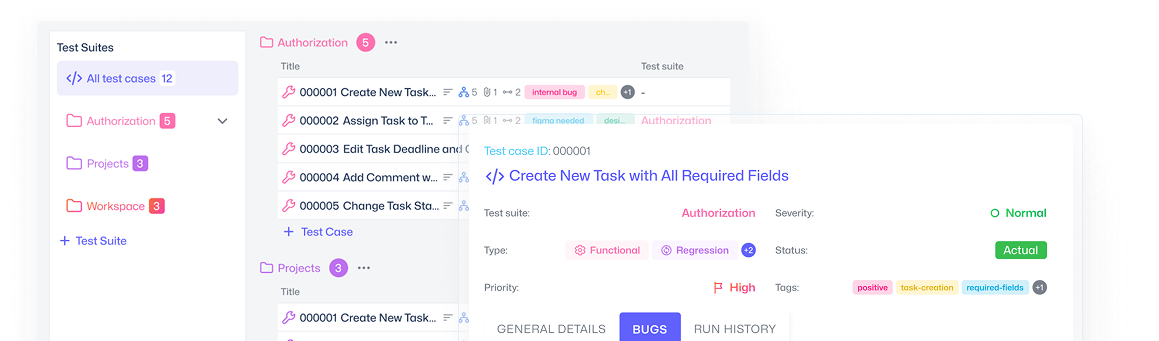
Teambox QA Testing helps your team ensure that every release meets the highest standards of quality — without slowing down the pace of delivery.

Teambox product hero illustration

Centralized QA Hub

Bring all your testing activities into one place. Teambox provides a dedicated QA Testing space inside every project, so your team can:
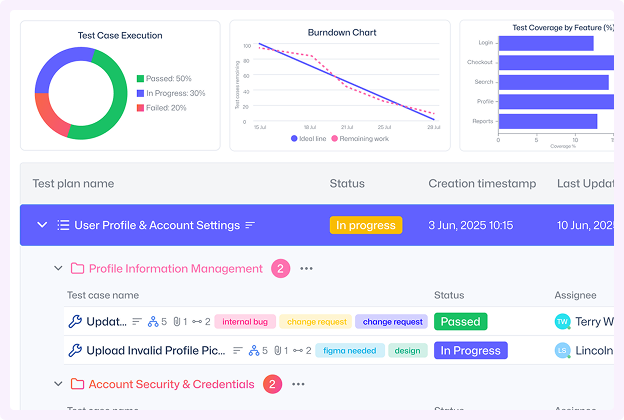
  • Organize test cases in structured suites for easy navigation.
  • Define test plans for upcoming sprints or releases.
  • Track execution history to see what passed, what failed, and what’s still in progress.
Centralized QA Hub

Test Cases — Organized and Reusable

Test cases are the building blocks of quality. In Teambox you can:
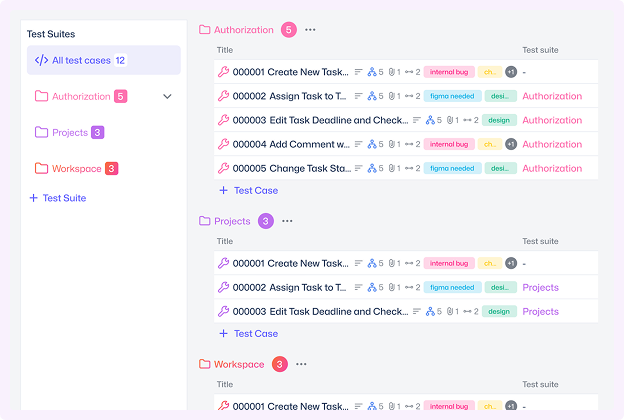
  • Create detailed cases with steps, expected results, and attachments.
  • Organize cases into logical suites and sub-suites for clarity.
  • Reuse and version test cases across projects, ensuring consistency.
  • Link cases directly to requirements, stories, or epics for full traceability.
Test Cases — Organized and Reusable

Test Plans — Execution with Context

Plan, run, and analyze your testing cycles with ease:
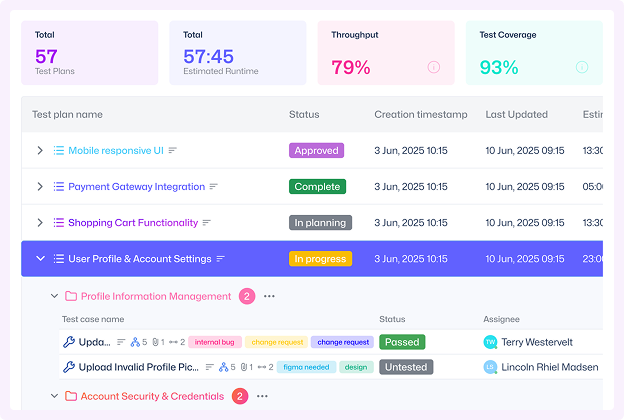
  • Future Runs: Schedule test execution for upcoming builds or sprints.
  • Ongoing Runs: Track real-time progress, completion rates, and defect links.
  • History Runs: Access past execution data to identify trends, regressions, and stability over time.
Test Plans — Execution with Context

Real-Time Collaboration

Teambox keeps your team instantly synchronized with real-time updates and built-in communication tools.
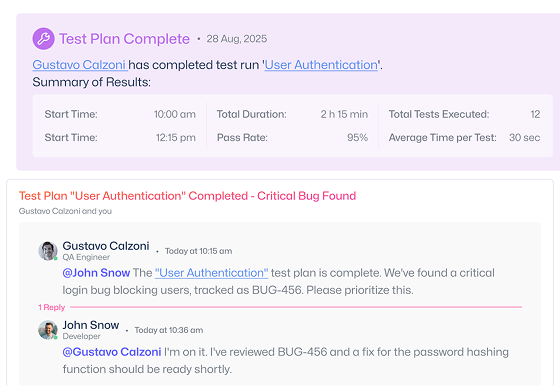
Real-Time Collaboration

Integrated Defect Management

No more switching tools. Failed test cases can be instantly converted into bug tickets in Teambox.
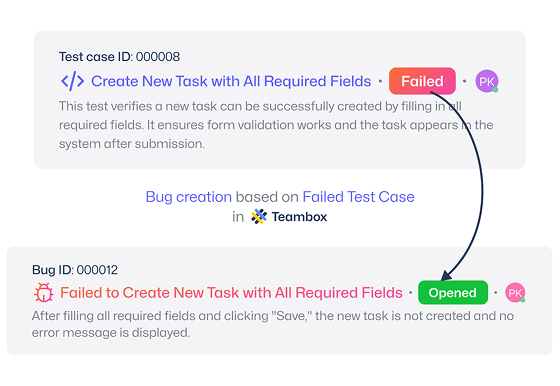
Integrated Defect Management

Powerful Reporting & Metrics

Get a clear view of project health with predefined QA dashboards and metrics:
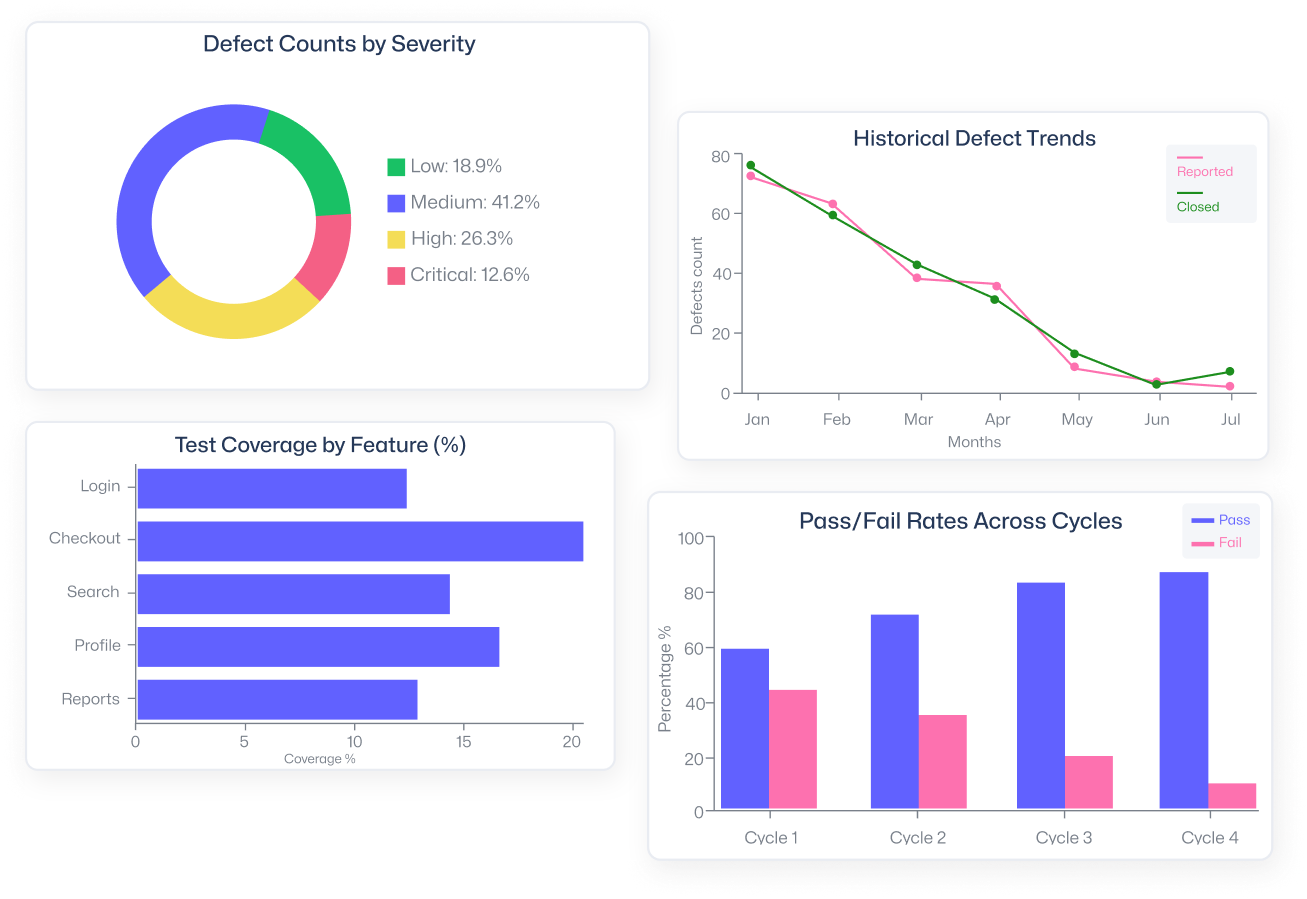
  • Test coverage by feature, epic, or requirement.
  • Pass/fail rates across cycles.
  • Defect counts by severity, priority, or source.
  • Historical trends that highlight improvement or recurring issues.
Powerful Reporting & Metrics

Why QA Testing in Teambox?

icon

Unified Workspace

One shared space for developers, testers, and managers — keeping QA aligned with every sprint.

icon

End-to-End Traceability

Full visibility from requirements to test cases, test runs, and defects — all automatically linked.

icon

Real-Time Updates

Live test execution and defect tracking keep teams synchronized without manual status checks.

icon

Unified Workspace

One shared space for developers, testers, and managers — keeping QA aligned with every sprint.

icon

End-to-End Traceability

Full visibility from requirements to test cases, test runs, and defects — all automatically linked.

icon

Real-Time Updates

Live test execution and defect tracking keep teams synchronized without manual status checks.

icon

Smart Test Management

Create, organize, and reuse test case efforts effortlessly with customizable fields and version control.

icon

Automated Defect Linking

Defects are auto-associated with test runs, ensuring faster triage and zero duplication.

icon

Scalable for Every Team

Works seamlessly for startups or enterprise QA operations — with flexible permissions and role-based views.

Why teams love teambox.dev

"The constant status meeting battle is finally over. With teambox.dev, everyone can see project progress so we spend more time actually building."

Emily M.

CEO

"My developers were constantly venting about our project management tool. Since switching to teambox.dev, the complaints have stopped, and the code is flowing!"

Mark. L

Dev Lead

Make decisions with confidence

Ready to see how teambox.dev improves aligment across teams?